The channel partner lead registration format your CP desk needs
By Jayesh G, Founder · 10 min read. Published 29 October 2026.
In short
- Use one registration format for every channel partner: nine fields (eight from the partner, one stamped by your desk), sent before the visit, checked by mobile number.
- Send every partner a written acknowledgement with a reference number and the date the registration ends. A registration without one is easy to dispute.
- Collect only what the registration needs. Don’t ask for ID numbers or income at this stage.
On this page
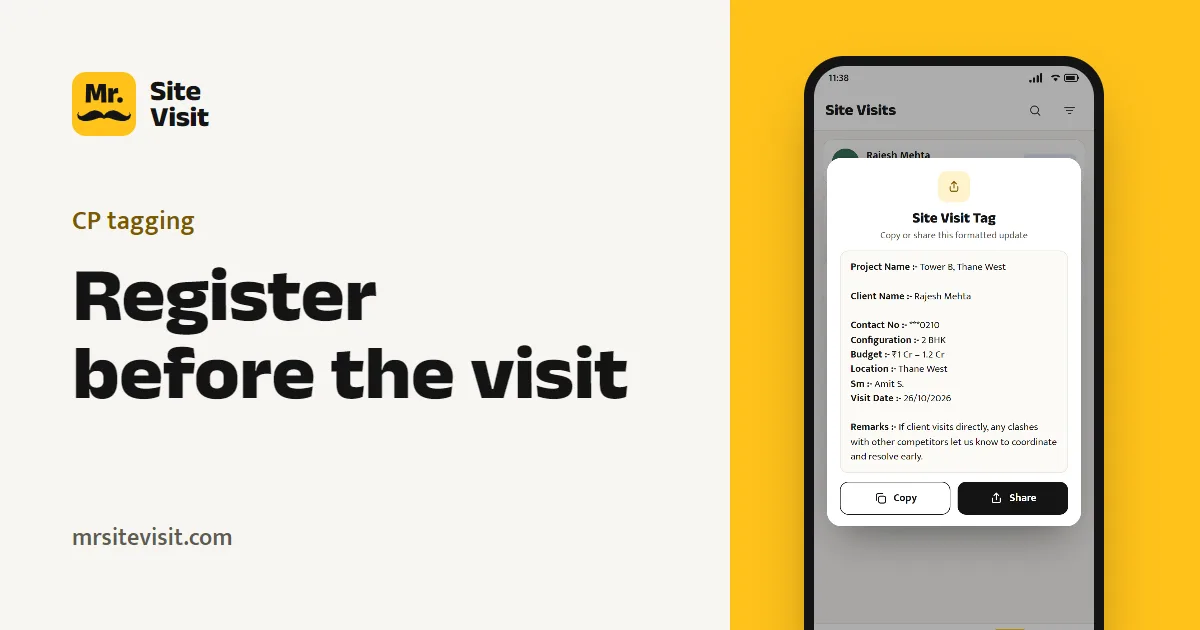
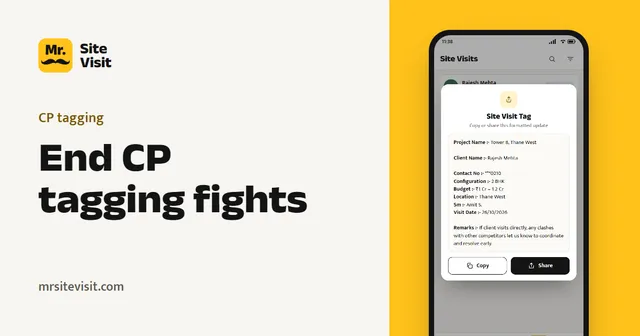
A WhatsApp on the CP (channel partner) desk phone says only: a first name, ten digits and “pls tag sir”. Three weeks later, that buyer books. Two partners and your own walk-in team all say the buyer was theirs.
Where did it go wrong? Many of those fights start with a weak registration. No surname, no project, no date your desk can prove. The cost is real: you pay brokerage to the wrong partner, or you lose a good one over a fight you can’t settle. So the fix is a format: the same few fields from every partner, an acknowledgement in writing, and one log your desk keeps.
A registration settles a claim only if it shows who introduced which buyer, for which project, and when your desk received it. It shows who registered first. Whether brokerage is paid, and how much, is decided by your partner agreement.
Below: the nine fields, the acknowledgement to send back, when to reject one, and a log to download.
The simple rule No registration before the visit, no claim. Your desk replies the same day, and every registration is matched by mobile number.
Nine fields settle most claims
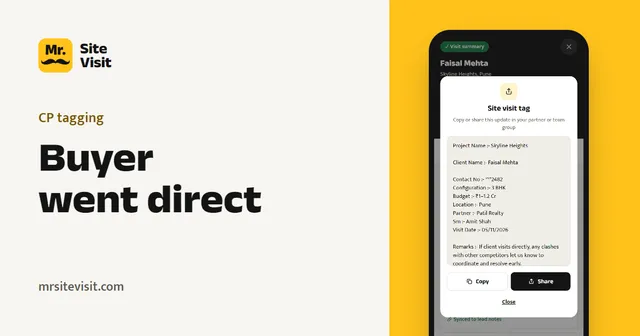
Every registration carries nine fields, in the same order. The partner sends eight; your desk stamps the ninth. Each one answers a question you’ll face later:
| Field | Why your desk needs it |
|---|---|
| Buyer’s full name | First names repeat; a full name tells two buyers apart |
| Buyer’s mobile, with country code | The one field you match duplicates on |
| Project | A registration for one project doesn’t cover another |
| Unit type or budget | Shows a real enquiry, not a list of numbers |
| Planned visit date | Tells your site team who to expect |
| Partner firm | Who the brokerage would go to |
| Partner code | One code per firm, issued by you when you sign them (EXR-07 for Example Realty, say) |
| Partner’s contact person | Who to call about this buyer |
| Received on (date and time) | Stamped by your desk, not typed by the partner. If you replied late, the partner’s message time counts |
The last field matters most. A partner can type any date on a message. Your desk’s time of receipt is the one both sides trust.
Email, locality and a note are fine as extras. Keep it to one screen of a phone, or partners will skip fields.
What not to ask for
Don’t ask partners for the buyer’s PAN, Aadhaar, income or bank details at registration. You don’t need them to know who introduced the buyer.
There’s a second reason. The Digital Personal Data Protection Rules, 2025 were notified on 14 November 2025, with an 18-month phased compliance period. The last phase ends around May 2027, and some duties may start earlier. A buyer’s name and number are personal data too. Collecting less is simpler to protect and easier to explain. Ask your lawyer how the rules apply to your firm, and whether partners should tell buyers their details go to you.
Check the partner once, when you sign them: their RERA registration number and agreement. Not on every registration.
Send an acknowledgement every time
A registration nobody acknowledged is a message, not a record. Reply to every one, in writing, the same day.
Send a rejection the same way, with the reason. A clear “no” today avoids a fight after the booking.
The rule cuts both ways. If a complete registration reached you and your desk didn’t reply by the next working day, count the partner’s message time as received. A good partner shouldn’t lose a buyer to your desk’s delay.
Why only the last 4 digits in the reply? The partner already has the number. Repeating it on every forward spreads it further than it needs to go.
When to reject a registration
Write these rules into your partner agreement, then apply them the same way for everyone:
| If the registration… | Then… |
|---|---|
| Matches a mobile number already registered and still valid | Reject it, and give the date of the earlier registration. Don’t name the other partner |
| Matches a buyer who enquired with you directly within your registration period, or already visited | Reject it, and say so in your agreement up front |
| Arrives after the buyer’s visit | Reject it, or record who approved an exception and why |
| Has no mobile number or no project | Ask for the missing field; don’t accept it half-filled |
| Is for a project the partner isn’t working on | Reject it, and tell them which projects they can register for |
| Comes in a bulk list before a launch, with no visit dates | Ask for a planned visit date for each buyer before you accept |
Matching by mobile number is the key. Names come with spelling changes; a number doesn’t.
When a registration expires, the buyer is free again. The same partner can register them afresh, or renew if your agreement allows it. Another partner can register them too. Keep the old row in the log. The tie rule (who wins when two partners register the same buyer) only applies to registrations that were valid at the same time.
Count the right thing, too. Is a partner who sends 40 registrations and brings 2 visits (example numbers) your best partner? No. Track visits done per registration, by partner, not the number of registrations.
Download the registration log
Keep one log for every registration, accepted or rejected.
Its columns:
- Reference, received date and time, and the nine fields above
- Status: accepted, rejected or expired, and the reason
- Valid until: the received date plus your registration period (in a sheet, the date cell + 60)
- Visit done on, filled in by your site team
Never edit or delete an old row. If something changes, add a new row with a note. A log anyone can edit proves nothing in a dispute.
Section 10 of the RERA Act, India’s real-estate law, covers partners too. A registered agent has to keep books of account, records and documents, as the rules prescribe. Your acknowledgements are useful records for them to keep.
How the CP desk runs it every day
A format works only if the desk handles it the same way every day:
- One channel One WhatsApp number or form for registrations, not five salespeople’s phones.
- Check the number Search the log and your lead list by mobile before you accept.
- Reply the same day Accept or reject, in writing, with a reference.
- Tell the site Share the day’s accepted registrations with the site team each morning.
- Close the loop When the visit happens, fill in the date in the log.
One named person on the CP desk should run it, with a backup for days off. A registration that sits unread over a Saturday rush is how two partners end up claiming one buyer.
Signing up new partners at a meet? Use our channel partner meet kit.
Which team are you?
The format is the same for everyone. What changes is the volume, and who owns the log. A mandate company (one that sells a developer’s project for them) usually has the most partners:
| Your team | Who owns the log | Watch out for |
|---|---|---|
| A small developer, one project | The sales manager | Registrations arriving on personal phones |
| A developer with several projects | A CP desk, one log for all projects | One buyer registered for two projects |
| A mandate company with many partners | The CP desk, by project | Partners registering whole lists before a launch |
| A CP firm registering with developers | Your own copy of every acknowledgement | A developer’s desk that never replies |
If you’re the partner, the same nine fields work in your favour. Send them complete, ask for the reference, and keep every acknowledgement. Our post on settling who-brought-this-buyer fights covers the tie rule in detail. My honest answer: use the first valid registration, and use the first visit only when two arrive the same day.
My honest answer for a one-project developer with fewer than 10 partners: a sheet and one WhatsApp number are enough. Start there. The con of a strict format is that it needs a desk that replies every day.
“Partners won’t fill eight fields”
Some won’t, at first. Make it easy. Send them the template once. Accept it as a WhatsApp reply. Most fields take a few seconds.
Then keep to the rule. A partner who skips the mobile number loses the registration, not you. In my view, a rejection with a clear reason, sent the same day, works better than reminders. For a big partner, call once and explain the format. After that, the same rule applies to them.
What I’d check this week
You can do these with your current WhatsApp and a sheet:
- Count last month’s registrations that had no surname, no project or no full mobile
- Write down your registration period and tie rule, if they aren’t in your partner agreement
- Send the eight-field template to every active partner
- Start the log today, and acknowledge every registration in writing
Where software helps
A log works if the desk checks every number and keeps every claim with its date. Software does the checking as each lead comes in.
On Mr. Site Visit’s Developer plan:
- Each partner has a partner code, and each claim a tagging window (the days it stays valid): 60 by default, yours to change
- Your CP desk enters each registration from the partner’s message, tagged with the partner’s code
- Claims for the same buyer land in one queue, with their dates and the first visit
- Duplicates are caught by mobile number when a lead comes in
At the site, reception can check a buyer in on a form. The buyer confirms their number with an OTP (a one-time code sent to their phone), and the partner code tags the partner. This doesn’t replace the registration before the visit.
Partners need no login or paid seat, and can’t see their own status in the tool yet. Your team sends them the acknowledgement on WhatsApp; the tool doesn’t send it by itself.
The Developer plan is ₹1,298 a user a month, billed yearly, from three users, with no GST on top. See the plans and prices, or how it works for developers and mandate companies.
Start with the template this week. Send it to your partners, run one log, and let the first month of acknowledgements show you where claims were slipping.
Questions teams ask
What details should a channel partner give to register a client?
Eight from the partner are enough. The buyer’s full name and mobile number, the project, unit type or budget, and the planned visit date. Then the partner firm, its partner code and contact person. Your desk adds the ninth, the date and time it received it, plus a reference number and the end date.
How long should a channel partner registration stay valid?
It’s your decision, written in your agreement with partners. Pick a fixed number of days from the date you receive it, long enough for a real buyer to visit and short enough that one registration can’t block others for months. Our software starts at 60 days. State the end date in every acknowledgement.
What if two channel partners register the same buyer?
Apply the tie rule in your partner agreement, the same way every time: usually the first registration you received, or the first visit. Match by mobile number, not name. Tell the second partner the same day, in writing.
Should a developer accept a registration after the site visit?
I’d reject it, and the rule should be written down. A registration after the visit can’t show who brought the buyer. If you make an exception, record who approved it and why.
Can we ask channel partners for the buyer’s PAN or Aadhaar at registration?
There’s no need at this stage. A registration only has to show who introduced which buyer, and when. Collect ID details later, at booking, when you need them. Ask your lawyer how the data protection rules apply to your firm.
Sources
- The Real Estate (Regulation and Development) Act, 2016, India Code (Section 10: an agent shall maintain and preserve books of account, records and documents as prescribed)
- Press Information Bureau, Government notifies DPDP Rules to empower citizens and protect privacy, 14 November 2025: Digital Personal Data Protection Rules, 2025 notified with an 18-month phased compliance period